
Slide past the ads and noise.
A podcast app for iPhone that skips what listeners vote to skip.
Coming soon to iPhone.





Somebody already sat through that ad. You do not have to.
Flightless runs on skips that listeners mark and vote on. Once enough people agree, the app jumps over that part for everyone.
A listener marks it
Tap Mark a Skip when the ad starts and again when it ends, then pick why it should go.
Everyone votes
Listeners upvote the skips that are right and downvote the ones that are off, so the best ones rise to the top.
You slide right past
When a skip has enough votes, Flightless jumps it while you listen. Your phone stays in your pocket.
Every skip carries a reason
- Intro
- Sponsor
- Ad
- Outro
- Other
Want to hear it anyway? Scrub back into any skip and it plays. Flightless figures you meant it.
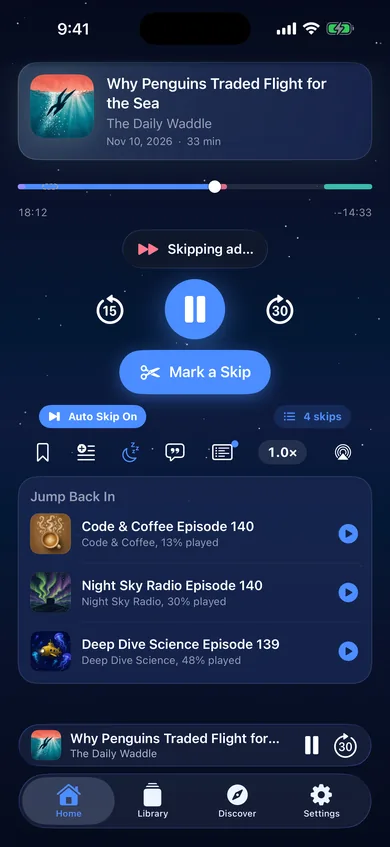
Adding a skip takes a few taps
Hear an ad nobody has marked yet? Tap Mark a Skip at the start and again at the end, then:
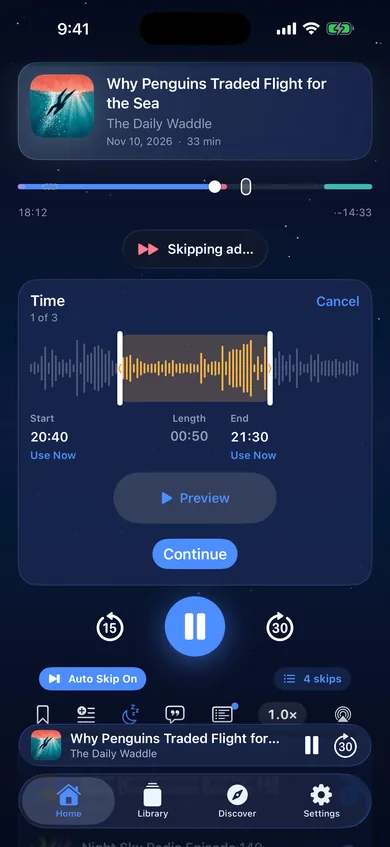
1. Time
Drag the range or type the times.
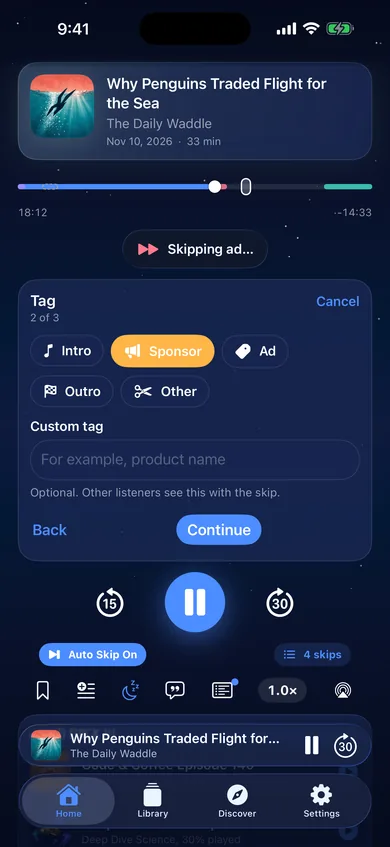
2. Tag
Say what it is.
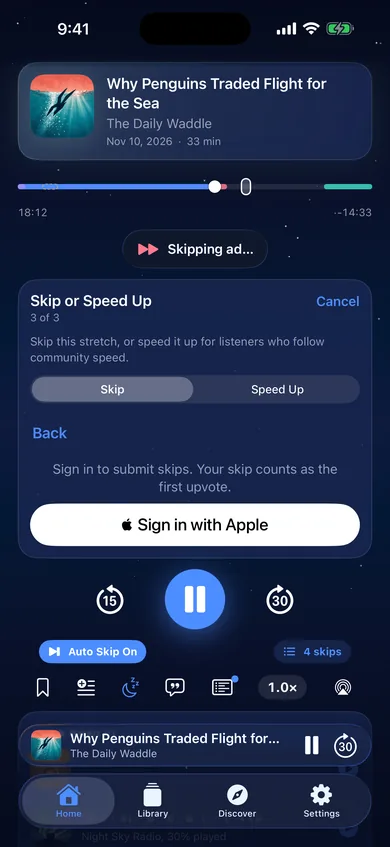
3. Skip or Speed Up
Send it. Your vote counts first.
The rest of the player, too.
Follow your shows, find new ones, and actually finish the episodes you start.
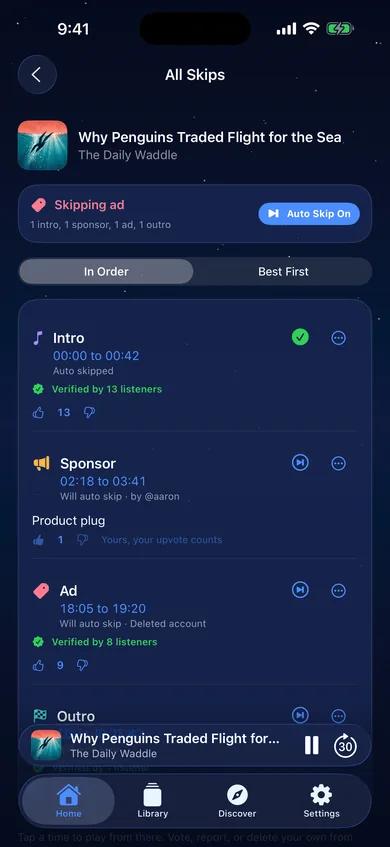
Every skip, out in the open
See each skip on an episode with its reason, its times and its votes. Play from it, vote on it, or report it if something is off.
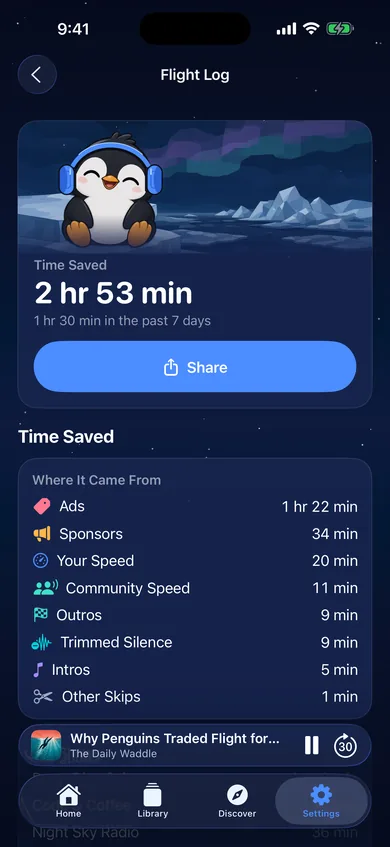
See the time you got back
Your Flight Log adds up the time saved by skips, faster speeds, community speed and trimmed silence. Proud of it? Share it.
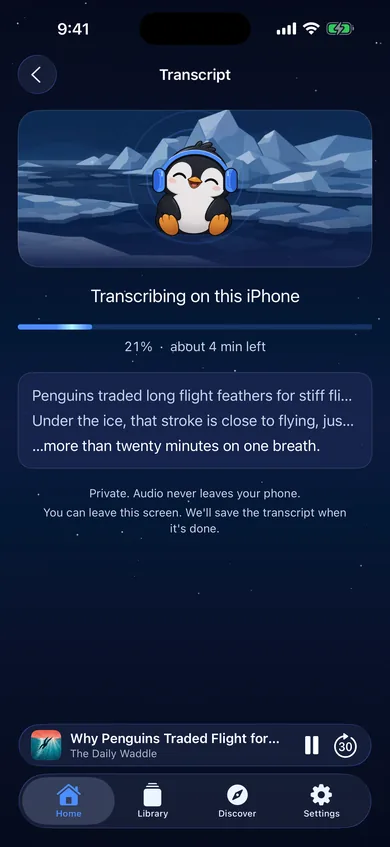
Read along, privately
Flightless uses the show's own transcript when it has one. When it does not, you can transcribe the episode right on your iPhone. The audio never leaves your phone.
Screens are from the Flightless app, shown with sample shows.
Also built in
Every skip for a show in one place
Open any show to see the skips listeners have added across its episodes, sorted by best or newest.
Chapters that just work
Chapters from the feed or the audio itself. Tap one to jump straight there.
Notes that stay yours
Jot down thoughts on any episode. Private unless you share them, and they sync once you sign in.
Find your next favorite show
Search Apple Podcasts and Podcast Index at once, or browse the top shows.
Your shows, your way
Playlists, downloads for the plane, and OPML import from your old app.
Skip on your terms
Skip with a heads up, skip silently, or have Flightless ask first. You pick how many votes a skip needs.
Community speed
Listeners can speed up the slow stretches. Follow their ranges, then drop back to your own speed.
Voice Boost
Evens out the volume and makes voices clearer.
Trim Silence
Shortens the pauses in episodes you have downloaded.
Sleep timer
Stop after a few minutes or at the end of the episode.
Widgets and Live Activities
Now Playing, Up Next and Time Saved widgets, plus a heads up on your Lock Screen right before a skip.
Mark a Skip from Control Center
Catch an ad without opening the app. One tap marks the start, the next marks the end.
Sunday Recap
An optional Sunday note with the time Flightless saved you that week.
Light or dark
Dark by default, light if you prefer, or follow your iPhone.
Private by default.
A podcast app should not need to know much about you. Here is how Flightless treats you.
Listen without an account
No sign up to start listening, following shows or skipping. You only sign in, with Apple, to add skips, vote or keep notes.
No ads, no trackers
No third party advertising, analytics or tracking tools, in the app or on this site.
Sharing is your call
Listening data stays off unless you turn it on. Turn it off anytime and the data linked to you is deleted.
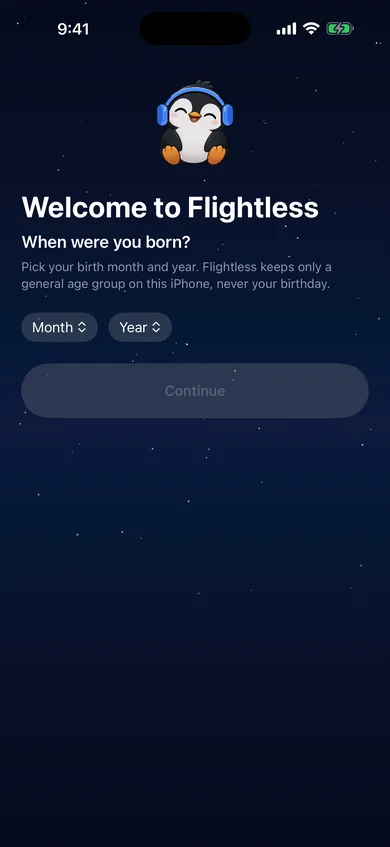
No birthday on file
Flightless asks your birth month and year once and keeps only a general age group on your iPhone.
Keep it kind
Everyone agrees to keep it kind before adding a skip or a note. You can report anything and block anyone.
Leave whenever you like
Delete your account right in Settings. Skips you added can stay up for everyone else, with your name taken off.
Questions people ask
When can I get Flightless?
Flightless is coming soon to iPhone. Tap Get notified at the top of this page and we will email you when it lands in the App Store. The link will be right here too.
Do I need an account?
No. Listening, following shows, downloads and auto skip all work without one. Sign in with Apple when you want to add skips, vote or keep notes.
Who decides what gets skipped?
Listeners do. A skip plays automatically once it has two more upvotes than downvotes. You can change that number in Settings, or turn auto skip off.
What if a skip cuts off something I wanted to hear?
Scrub back into it and Flightless lets it play. You can also downvote it so it stops bothering everyone else.
Will it work with my podcasts?
Flightless plays podcasts that publish a public RSS feed. Search pulls from Apple Podcasts and Podcast Index, and you can import your shows with an OPML file. Skips appear on episodes where listeners have added them, and you are welcome to add the first one.
Does it sync between devices?
Your private notes sync once you sign in. Your library, downloads and listening progress live on your iPhone.
What happens if I delete my account?
Your account and the listening data linked to it are deleted. Skips you added can stay so other listeners keep the benefit, shown as from a deleted account. The privacy policy has the details.
Something else on your mind? Visit support

Get your listening time back.
Flightless is coming soon to iPhone. Leave your email and we will tell you the day it lands.
See how skipping works